Amazon Keyword Research: Complete 3-Stage Guide (2026)
Table of Contents
Introduction
Your competitor is stealing your customers using better Amazon keyword research.
They launched the same product three weeks after you did. Their listing ranks page one while yours sits buried on page seven. The difference isn’t their product quality or their price. It’s the words in their listing.
This article delivers a complete, time-efficient Amazon keyword research process. You’ll learn exactly what keyword research is, why it determines your listing’s success, where to find high-converting keywords using both free and paid methods, how to evaluate keyword quality using a four-point validation framework, and where to place keywords in your listing for maximum impact.
What Is Amazon Keyword Research and Why Does It Matter?
Page seven doesn’t pay your bills.
Amazon keyword research is the systematic process of identifying the specific words and phrases customers type into Amazon’s search bar when looking for products like yours, then strategically incorporating those terms into your product listing to improve search visibility and conversion rates.
When you create or optimize a listing without keyword research, you’re guessing what customers search for. You might call your product a “water bottle,” but if 80% of customers search for “insulated water flask,” your listing won’t appear in their results. Amazon’s A9 algorithm matches search queries to listings based on keyword relevance. If the words customers search for don’t exist in your title, bullet points, description, or backend keywords, Amazon won’t show your product.
Keyword research matters because visibility drives sales. A product ranking on page one for a high-volume keyword receives exponentially more clicks than a product on page three. According to Amazon’s own data, the top three organic positions capture approximately 64% of all clicks for a given search term. Moving from position ten to position three can double or triple your daily sales without changing your product or price.
Beyond initial visibility, proper keyword research improves your listing’s conversion rate. When your title and bullets use the exact language customers are searching for, the listing feels immediately relevant. This relevance builds trust and reduces bounce rates, which signals to Amazon your listing satisfies searcher intent. The algorithm responds by ranking you higher over time, creating a compounding visibility advantage.
The research process takes time upfront (2-12 hours depending on your approach and tools), but it’s a one-time investment per product with monthly maintenance. The alternative is running Amazon PPC campaigns blindly without knowing which keywords actually convert, which costs far more in wasted ad spend than the research time investment.
The Three-Stage Amazon Keyword Research Process
Start wide. Narrow strategically. Prioritize ruthlessly.
Amazon keyword research follows a funnel structure: begin with brainstorming, narrow using data validation, then prioritize strategically for implementation.
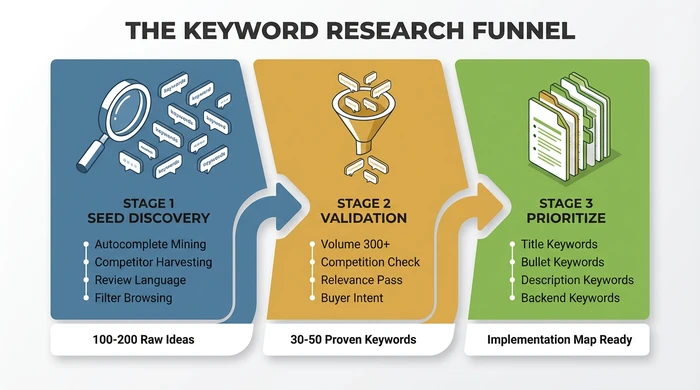
The three-stage keyword research funnel transforms 100+ raw ideas into a prioritized implementation map.
Stage 1: Seed Discovery (100+ Raw Keywords)
Volume beats perfection here.
Your goal in this stage is generating as many relevant keyword ideas as possible without filtering. You’ll validate them in stage two.
Amazon Search Bar Autocomplete: Start typing your product category into Amazon’s search bar. Amazon auto-populates the most frequently searched terms in real-time. For example, typing “yoga mat” reveals suggestions like “yoga mat extra thick,” “yoga mat with alignment lines,” and “yoga mat non slip.” Record every suggestion relating to your product. Repeat this for 10-15 related seed terms (yoga mat, exercise mat, workout mat, fitness mat).
Competitor Listing Harvesting: Find the top 5-10 competitors ranking on page one for your primary category keyword. Copy their entire title, bullet points, and description into a document. Highlight repeated terms and phrases. Competitors who rank well have already done keyword research. You’re not copying their listings, you’re identifying which terms Amazon’s algorithm validated as relevant for your category.
Customer Review Mining: Read 20-30 reviews on top competitor products. Customers use different language than sellers. They might call a feature “slip-resistant” while you call it “non-slip.” They might search for “travel yoga mat” while you think of it as “foldable.” Record the exact phrases customers use to describe benefits, problems, and use cases.
Category and Filter Browsing: Navigate to your product category on Amazon. Look at the left sidebar filter options. Amazon displays these filters because customers use them frequently. Terms like “BPA-free,” “dishwasher safe,” or “organic” are searchable keywords. Record relevant filter terms.
Plurals and Variations: For each seed keyword, create variations: singular/plural (yoga mat/yoga mats), spelling variations (grey/gray), and synonym variations (water bottle/water flask/hydration bottle). Amazon treats these as separate keywords in most cases.
By the end of stage one, you should have 100-200 raw keyword ideas in a spreadsheet. Use a list to CSV converter to quickly format your keyword lists for bulk upload or further analysis. Many will be irrelevant or low-volume. That’s expected. Stage two filters them.
Stage 2: Volume Validation (30-50 Proven Keywords)
Data separates opportunity from waste.
Now you apply data to determine which keywords from stage one are worth targeting.
Search Volume Assessment: Use a keyword tool (free or paid, covered in the next section) to check estimated monthly search volume for each keyword. Amazon doesn’t publish official search volume data, so tools estimate it using various methods. Look for keywords with at least 300-500 monthly searches. Lower volume is acceptable for long-tail keywords if they’re highly relevant.
Competition Evaluation: High search volume means nothing if 500 established brands dominate page one. For each keyword, search it on Amazon and evaluate the top 10 results. Ask: Are these listings from major brands with 10,000+ reviews? Are they sponsored ads or organic results? Is there any listing on page one with fewer than 100 reviews? If every result is a major brand with 5,000+ reviews, you likely can’t rank organically for that keyword as a new seller. Flag it for future PPC use only.
Relevance Filtering: Remove keywords that don’t accurately describe your product. If you sell a 24oz stainless steel water bottle, the keyword “glass water bottle” has high volume but zero relevance. Using irrelevant keywords damages your conversion rate and Amazon will stop showing your listing for those terms over time.
Intent Alignment: Not all searches indicate buying intent. The keyword “how to clean a yoga mat” has search volume but represents informational intent, not purchase intent. Focus on keywords where the searcher is likely ready to buy: product type + feature (insulated water bottle), product type + use case (yoga mat for hot yoga), product type + material (stainless steel tumbler).
Apply the four-point quality test to every keyword:
- Relevance: Does this term accurately describe my product?
- Volume: Are at least 300+ people searching this monthly?
- Competition: Can I realistically rank on page one within 3-6 months?
- Intent: Will searchers using this term be ready to purchase?
Keywords passing all four tests move to stage three. You should end with 30-50 validated keywords.
Stage 3: Strategic Prioritization (Organized Implementation Map)
Placement isn’t equal. Amazon plays favorites.
You have validated keywords, but not all placements are equal. Amazon weighs keyword placement differently.
Title Keywords (Highest Priority): Your product title is the most powerful ranking signal. Place your 1-2 highest volume, most relevant keywords here. Amazon recommends keeping titles under 200 characters, but more importantly, the first 80 characters appear in mobile search results. Front-load your primary keyword.
Bullet Point Keywords (Secondary Priority): Integrate 5-10 secondary keywords naturally into your bullet points. Don’t keyword-stuff. Each bullet should communicate a benefit while incorporating a keyword. Example: “Leak-proof lid with one-handed flip design keeps your bag dry during commutes” targets “leak-proof” and “one-handed” while remaining readable.
Description Keywords (Tertiary Priority): Use long-tail keyword variations and contextual terms here. The description has less ranking weight than title and bullets, but it still contributes to indexing. It also helps conversions by answering detailed questions.
Backend Search Terms (Character Limit Optimization): Amazon gives you 250 bytes (not characters, bytes) for hidden backend keywords. Use this space for relevant terms that didn’t fit naturally into your visible content: alternate spellings, abbreviations, synonyms. Don’t repeat keywords already in your title or bullets; Amazon indexes those automatically. Don’t use competitor brand names (violates Amazon TOS). Separate terms with spaces, not commas.
Create a keyword map document with four columns: Keyword, Search Volume, Priority (High/Medium/Low), and Placement (Title/Bullets/Description/Backend). This becomes your implementation checklist.
Where to Find Amazon Keywords: Free vs. Paid Tools
Time or money. Pick your investment.
You don’t need paid tools to do effective keyword research. These are some great free ways to generate a list of keywords that sell..
Free Tools and Methods
Amazon Search Bar Autocomplete: Already covered in stage one. This is Amazon’s official data on what customers search for. It’s free, accurate, and updated in real-time. Limitation: You get suggestions but no search volume data or competition metrics.
Amazon Product Opportunity Explorer: Available to brand-registered sellers in Seller Central under Brands > Product Opportunity Explorer. Shows search volume ranges, click share, and conversion share for keywords and niches. This is Amazon’s official keyword data. Limitation: Requires brand registry (which itself requires a registered trademark, adding cost and time). Data is aggregated into ranges (e.g., 10K-100K searches) rather than precise numbers.
Amazon Search Query Performance Dashboard: Available to sellers with active listings. Shows which keywords customers used to find your product in the last 90 days. Limitation: Only works after your listing exists and receives traffic, so it’s useful for optimization but not for pre-launch research.
Competitor Listing Analysis: Manual method covered earlier. Completely free, highly accurate for relevance, but time-intensive and provides no volume data.
How to Evaluate Keyword Quality: The 4-Point Test
Most keywords don’t deserve your listing.
You have a list of potential keywords. Not all are worth targeting. Apply this filter to every keyword before adding it to your listing.
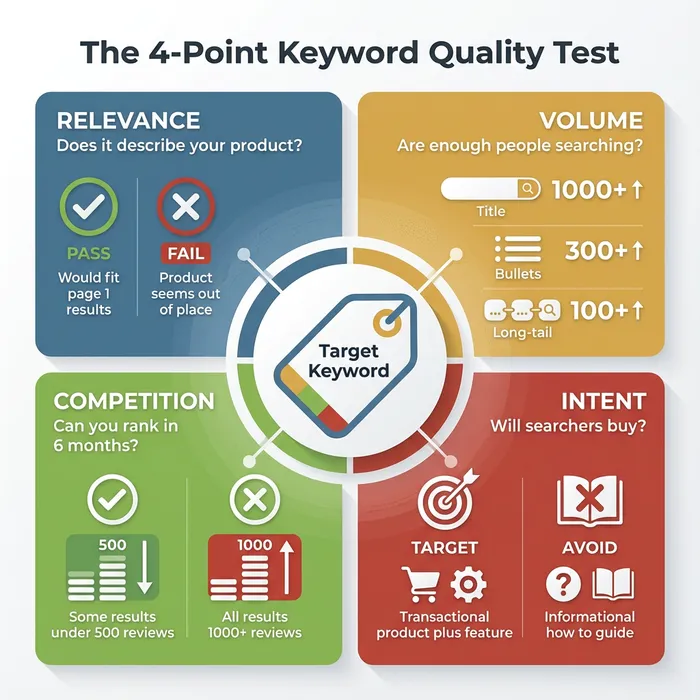
Every keyword must pass all four criteria before earning a place in your listing.
Test 1: Relevance (Pass/Fail)
Does this keyword accurately describe your product?
Search the keyword on Amazon. Look at the top 10 results. If your product would feel out of place among those results, the keyword fails relevance. Example: You sell a stainless steel insulated tumbler. The keyword “coffee mug” has high volume, but search results show ceramic mugs with handles. Your tumbler isn’t a mug. Fail.
Relevance is binary. A keyword either describes your product or it doesn’t. If you’re unsure, ask: “Would a customer searching this term be satisfied finding my product?” If the answer isn’t a clear yes, skip it.
Test 2: Volume (Minimum Threshold)
Are enough people searching this term to make it worth targeting?
For main keywords (title placement): 1,000+ monthly searches minimum For secondary keywords (bullets, description): 300+ monthly searches minimum For long-tail keywords (backend, niche targeting): 100+ monthly searches acceptable if highly relevant and low competition
Volume thresholds vary by category. Niche categories (like specialized industrial equipment) have lower overall search volumes. Adjust thresholds proportionally. The goal is ensuring the keyword represents actual customer demand, not just a phrase you think sounds good.
Test 3: Competition (Reality Check)
Can you realistically rank for this keyword within 6 months?
Search the keyword on Amazon. Analyze page one results:
Red Flags (Skip or PPC-Only):
- All results have 1,000+ reviews
- All results are from recognized major brands (Yeti, OtterBox, Anker)
- All results are sponsored ads with no organic results on page one
- Category dominated by Amazon’s Choice or Amazon Basics
Green Lights (Target Organically):
- Mix of review counts (some under 500 reviews rank on page one)
- Mix of established and newer brands
- At least 2-3 organic results on page one
- You can match or beat the quality/images/price of page one listings
Competition assessment isn’t about avoiding competitive keywords entirely. It’s about being realistic. If you’re a new seller with a generic product entering a saturated category, ranking organically for “yoga mat” (ultra-competitive) in 6 months is unlikely. But “yoga mat with carrying strap” (more specific, less competition) is achievable.
Test 4: Intent (Buyer Readiness)
Will someone searching this term be ready to purchase?
Keywords fall into four intent categories:
Informational Intent: “how to choose a yoga mat,” “yoga mat thickness guide” - Searcher is researching, not buying. Skip for product listings (these keywords work for blog content, not Amazon listings).
Navigational Intent: “Lululemon yoga mat,” “Manduka Pro review” - Searcher wants a specific brand. Only target if it’s YOUR brand. Never use competitor brand names in your listing (TOS violation).
Investigational Intent: “best yoga mat for beginners,” “yoga mat comparison” - Searcher is evaluating options. Medium buying intent. Good for PPC, weak for organic SEO because the searcher hasn’t decided on specific features yet.
Transactional Intent: “buy yoga mat,” “yoga mat extra thick,” “non slip yoga mat” - Searcher knows what they want and is ready to purchase. Highest priority for listings. These convert.
Focus on transactional intent keywords. They drive revenue. The others drive traffic that doesn’t convert, which hurts your listing’s performance metrics over time.
Applying the 4-Point Test:
Create a spreadsheet with columns for each test. For every keyword, mark Pass/Fail for Relevance, the actual volume number, a Competition score (Low/Medium/High), and the Intent category. Filter to show only keywords passing Relevance + meeting Volume threshold + having Low or Medium competition + showing Transactional intent.
Those are your target keywords.
Where to Place Keywords in Your Amazon Listing
Amazon doesn’t treat all real estate equally.
You have validated keywords. Placement determines whether Amazon indexes them and how much ranking weight they receive.
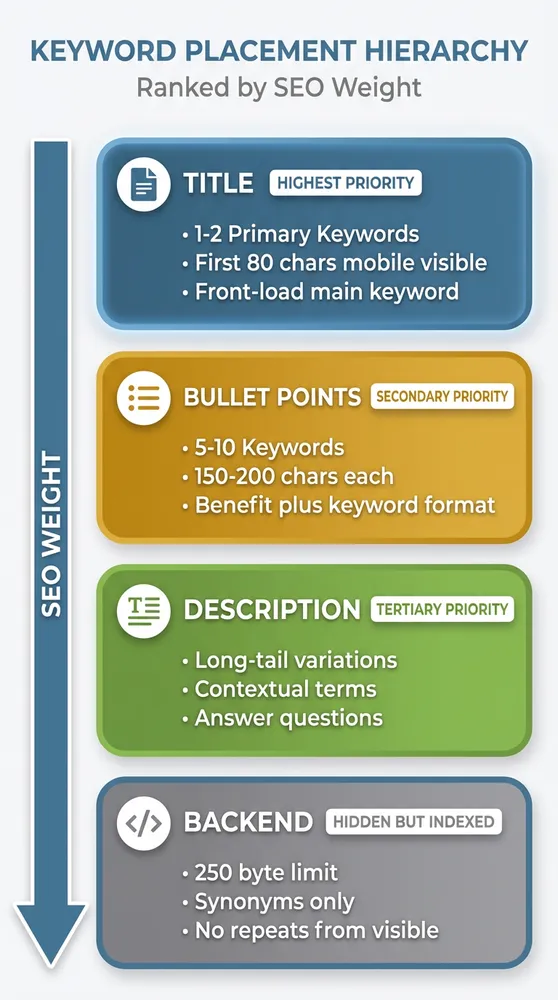
Amazon weighs keyword placement differently, with title keywords receiving the highest ranking signal.
Title (Maximum Ranking Weight)
Amazon’s algorithm prioritizes title keywords above all other placements. Your title must include your primary keyword within the first 80 characters (mobile search cutoff) and follow Amazon’s category-specific formatting guidelines.
Example (Water Bottle Category): Insulated Water Bottle with Straw, 32oz Stainless Steel Leak Proof Flask for Sports, Gym, Travel
Breakdown:
- Primary keyword: “Insulated Water Bottle” (front-loaded)
- Feature: “with Straw” (differentiator + secondary keyword)
- Specification: “32oz Stainless Steel” (volume data)
- Use cases: “Sports, Gym, Travel” (captures related search terms)
Title Rules:
- Don’t exceed 200 characters (Amazon truncates, and some categories have lower limits)
- Front-load your highest-priority keyword
- Include numbers/specifications customers search for (ounces, pack quantity, size)
- Use natural language; avoid keyword stuffing making the title unreadable
- Don’t use all caps, promotional language (BEST, #1), or special characters
Amazon’s title guidelines vary by category. Check Seller Central > Inventory > Product Detail Page Rules for your specific category before finalizing.
Bullet Points (Secondary Ranking Weight + Conversion)
Bullets serve two purposes: they help Amazon index secondary keywords and they convince shoppers to buy. Balance keyword optimization with readability.
Bullet Structure: [BENEFIT HEADLINE]: Specific feature explanation including keyword naturally
Example: LEAK-PROOF DOUBLE-WALL INSULATION: Vacuum-sealed stainless steel construction keeps drinks cold for 24 hours or hot for 12 hours, perfect for long workdays, road trips, and outdoor adventures. The secure screw-on lid prevents spills in your bag.
This bullet targets keywords: “leak-proof,” “double-wall insulation,” “vacuum-sealed,” “stainless steel,” “keeps drinks cold,” while remaining readable and benefit-focused.
Bullet Best Practices:
- Write 5 bullets (Amazon displays up to 5 in most categories)
- Each bullet: 150-200 characters for optimal mobile display
- Start with a capitalized benefit keyword or phrase
- Include 1-2 secondary keywords per bullet, integrated naturally
- Focus on customer benefits, not just features (don’t say “stainless steel,” say “dent-resistant stainless steel that lasts for years”)
- Address customer objections (concerns about size, compatibility, durability)
Product Description (Tertiary Ranking Weight + Enhanced Content)
The description section has lower SEO weight than title and bullets, but Amazon still indexes these keywords. Use this space for long-tail keyword variations and detailed context.
Description Strategy:
- Expand on bullet points with additional detail
- Use long-tail variations (if title says “yoga mat,” description can say “exercise mat for home workouts”)
- Answer common customer questions
- Include dimensions, materials, care instructions (searchable terms)
- Write for humans first; Amazon’s algorithm rewards readability
For brand-registered sellers, A+ Content (Enhanced Brand Content) replaces the standard description. A+ Content uses images and formatted layouts. You can still incorporate keywords into the text modules, but prioritize visual storytelling over keyword density.
Backend Search Terms (Hidden but Indexed)
Backend keywords are invisible to customers but Amazon indexes them for search. You get 250 bytes total (one byte per character in most cases, but special characters may use more).
Backend Keyword Rules:
- Don’t repeat keywords already in title, bullets, or description (wastes space; Amazon indexes those automatically)
- Use synonyms, alternate spellings, abbreviations (water bottle / hydration bottle / H2O bottle)
- Include relevant terms that didn’t fit naturally in visible content
- Separate terms with spaces, not commas or semicolons
- Don’t include competitor brand names (TOS violation, can get listing suppressed)
- Don’t include misleading terms (if your bottle isn’t glass, don’t put “glass” in backend)
- Ignore plurals if you already have the singular (Amazon indexes both automatically)
Example Backend Keywords for Water Bottle: hydration flask canteen thermos BPA-free dishwasher safe reusable gym workout hiking camping cycling office
Notice: No commas, no repeated words from the title, focused on synonyms and relevant use-case terms.
Common Amazon Keyword Research Mistakes and How to Avoid Them
Most sellers sabotage their own rankings.
Even with the right process, sellers make predictable errors hurting rankings and wasting time.
Mistake 1: Keyword Stuffing Cramming every possible keyword into your title and bullets makes your listing unreadable. Amazon’s algorithm has evolved to penalize listings with poor readability because they convert poorly. Customers bounce, Amazon stops showing your listing.
Solution: Use keywords naturally. If a keyword doesn’t fit into a coherent sentence communicating value, save it for the backend.
Mistake 2: Ignoring Amazon’s Native Data Sellers pay for tools before checking Amazon’s free resources. Product Opportunity Explorer and Search Query Performance provide actual Amazon data, not third-party estimates.
Solution: Start with Amazon’s tools (if you have access), then supplement with paid tools for deeper analysis.
Mistake 3: Researching Once and Never Updating Customer search behavior changes. Seasonal trends shift. Competitors launch new products with new keywords. Your initial keyword research becomes outdated within 6-12 months.
Solution: Schedule monthly reviews of your Search Query Performance dashboard. Identify new keywords customers use to find your product and add them to your listing. Quarterly, run a full keyword research refresh using your original process.
Mistake 4: Copying Competitor Keywords Blindly Just because a competitor ranks for a keyword doesn’t mean it’s a good keyword or they intentionally target it. They might rank accidentally or their listing might be underperforming.
Solution: Use competitor keywords as research starting points, not final decisions. Validate every keyword with the 4-point quality test.
Mistake 5: Targeting Only High-Volume Keywords Beginners chase keywords with 50K+ monthly searches. Those keywords have intense competition. You can’t rank for them organically as a new seller.
Solution: Build a keyword portfolio: 20% high-volume competitive keywords (for future PPC), 50% medium-volume moderate-competition keywords (for organic ranking), 30% long-tail low-competition keywords (for early sales and niche targeting).
Mistake 6: Forgetting About Mobile Search Over 70% of Amazon shoppers use mobile devices. Your title gets truncated to 80 characters on mobile. If your primary keyword is at character 120, mobile shoppers never see it.
Solution: Front-load your title. Put the most important keyword in the first 80 characters.
Variations and Exceptions: When Standard Keyword Research Doesn’t Apply
One size doesn’t fit every seller.
The process outlined above works for most Amazon sellers, but specific situations require adjustments.
KDP Authors (Book Publishing)
Kindle Direct Publishing allows only 7 keywords total, not 250 bytes. Keywords function differently: they determine category placement as much as search visibility.
KDP Keyword Strategy: Research category-specific keywords (search Amazon for successful books in your genre, note their categories). Use keyword phrases triggering specific browse categories (e.g., “cozy mystery small town” places your book in the Cozy Mystery category). Tools: Publisher Rocket ($97 one-time) specializes in KDP keyword and category research.
International Marketplaces (UK, Germany, Japan)
Search behavior varies by country and language. Direct translation rarely works. “Water bottle” in the US is often “reusable water bottle” in the UK and “Trinkflasche” in Germany (literally “drinking bottle”).
International Strategy: If expanding to non-US marketplaces, treat it as separate research. Use Amazon’s native autocomplete in that marketplace’s language. Don’t assume US keywords translate directly.
Handmade and Custom Products
Highly customized products (personalized items, made-to-order goods) have lower search volumes for exact-match keywords because customers search for general categories, then filter.
Handmade Strategy: Focus on category keywords (“personalized cutting board”) rather than ultra-specific variations. Use bullets and description to explain customization options. Backend keywords should include gift occasions and use cases (“wedding gift,” “housewarming”).
Brand-Restricted Categories
Categories like topical skincare, supplements, and grocery require brand registry, certifications, or approval. Keyword research remains the same, but compliance restrictions limit your claims.
Restricted Category Strategy: Avoid keywords implying medical claims if you can’t substantiate them. “Acne treatment” requires FDA compliance. “Gentle cleanser for sensitive skin” is safer. Consult category-specific guidelines before finalizing keyword choices.
Seasonal Products
Products with strong seasonal demand (Christmas decorations, Halloween costumes, pool floats) have keyword volume spiking 2-3 months before the season and crashing afterward.
Seasonal Strategy: Research keywords 4-5 months before peak season (research Christmas keywords in July). Track trends in Helium 10 or Google Trends to identify when customers start searching. Update your title and bullets seasonally to match current search behavior.
FAQ: Amazon Keyword Research
How many keywords should I target per product listing?
Focus on 30-50 validated keywords total. Your title will include 1-2 primary keywords. Bullets will cover 8-12 secondary keywords. Description will incorporate 10-15 long-tail variations. Backend search terms will capture the remaining 15-20 relevant synonyms and alternates. More keywords doesn’t equal better rankings. Relevance and strategic placement matter more than quantity.
Do I need to use all 250 bytes in backend search terms?
No. Only include relevant keywords. Using all 250 bytes with marginally relevant or irrelevant terms can hurt your listing’s relevance score. Amazon’s algorithm prioritizes quality over quantity. If you have 180 bytes of strong keywords, use those and leave the rest blank.
Should I include misspellings of keywords?
Amazon’s algorithm automatically accounts for common misspellings, so this is mostly unnecessary. Exception: If there’s a commonly used alternate spelling that isn’t a typo (grey vs. gray, tumbler vs. tumber), include it. Don’t waste backend space on obvious typos.
How often should I update my keywords?
Initial launch: Finalize keywords before listing goes live. First 90 days: Check Search Query Performance monthly to identify new keywords customers use. Add them to your listing. After 90 days: Quarterly keyword audits. Annually: Full keyword research refresh using the three-stage process, especially if you notice declining traffic or new competitors entering your niche.
Can I use competitor brand names in my backend keywords?
No. This violates Amazon’s Terms of Service. Your listing can be suppressed or removed. Even if you see competitors doing it, the risk isn’t worth it. Focus on generic descriptive keywords.
What’s the difference between Amazon SEO keywords and PPC keywords?
Amazon SEO keywords are terms you include in your listing to rank organically (free traffic). PPC keywords are terms you bid on in Sponsored Products campaigns (paid traffic). The research process is the same, but the strategy differs. For SEO, target keywords where you can realistically rank on page one organically (moderate competition). For PPC, you can target ultra-competitive high-volume keywords because you’re paying for visibility. Many sellers use PPC initially for competitive keywords while building organic ranking for moderate-competition keywords.
Conclusion
Amazon keyword research isn’t guesswork.
It’s a systematic process: generate 100+ raw keyword ideas using autocomplete and competitor analysis, validate them using volume and competition data, then prioritize strategically by placement weight. Free tools work if you invest 8-12 hours. Paid tools reduce that to 2-4 hours for $39+ monthly. Every keyword must pass the four-point quality test: relevance, volume, competition, and intent.
Your title gets your primary keyword in the first 80 characters. Bullets integrate secondary keywords naturally while communicating benefits. The description uses long-tail variations. Backend search terms capture synonyms and alternates within the 250-byte limit. Avoid keyword stuffing, update your keywords quarterly, and build a portfolio of high-volume, medium-volume, and long-tail keywords instead of chasing only competitive terms.
The research time you invest this week determines whether your product ranks on page one or page seven. Customers can’t buy what they can’t find. Start with Amazon’s autocomplete and competitor listings today. Apply the decision matrix to choose your tool approach based on your budget and time. Run the three-stage process. Your listing optimization isn’t complete until your keywords are.